

SAP SuccessFactors Release Center: What Administrators Need to Know in 1H 2026

Managing a major SAP SuccessFactors release is never just a documentation exercise.
Every 1H and 2H release brings new features, enhancements, deprecations and configuration decisions. For administrators, the challenge is not only knowing what has changed. It is working out what matters to your instances, who needs to review it, what action is required, and how to track that work before production timelines arrive.
With the 1H 2026 release, SAP SuccessFactors has introduced Release Center into Admin Centre. The aim is simple: bring release management closer to the system, the tenant configuration and the administrators responsible for managing change. SAP describes Release Center as a way to streamline major release management with tenant-aware filtering, collaboration tools and guided workflows.
What is SAP SuccessFactors Release Center?
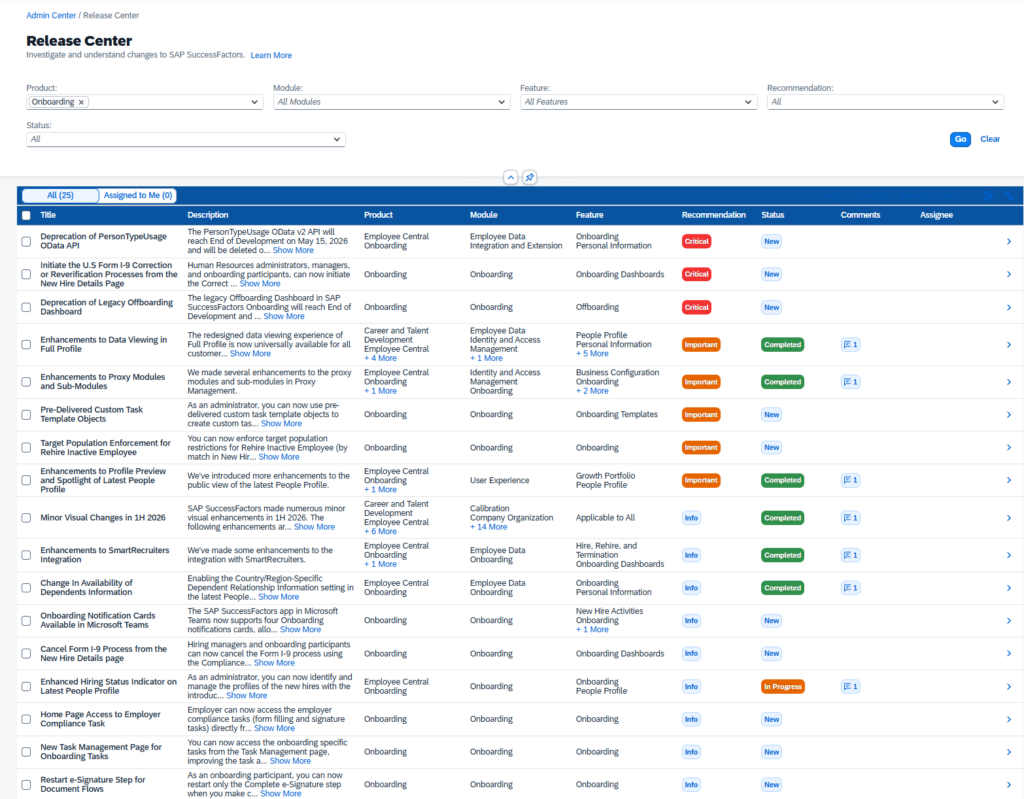
Release Center is an administrator tool inside SAP SuccessFactors Admin Centre that helps teams manage release changes. It pulls relevant content from the What’s New Viewer into Admin Centre, where each change is treated as an article. From there, it surfaces the changes most likely to matter to your organisation.
That distinction is important. The What’s New Viewer still exists in the SAP Help Portal and remains useful for subscriptions, sharing links and viewing the full release content. Release Center does not replace it. Instead, it gives administrators a more practical working view inside SAP SuccessFactors.
Why this matters for administrators
SAP SuccessFactors releases move quickly. SAP’s own release guidance notes that customers have around six weeks to understand, adopt and test the release package. For many HR, payroll, IT and people systems teams, that window is tight.
Release Center addresses a familiar problem. Release notes can be comprehensive, but not all changes are equally relevant. A change affecting a module you do not use may need no action at all. A deprecation, a permission change or a foundation update may need immediate review. Release Center is designed to reduce that noise through tenant-aware filtering, while still taking a conservative approach to changes SAP considers broadly important.
Tenant-aware filtering
Release Center filters release articles based on what is enabled in your tenant. If a change affects a product or module you use, it is more likely to appear in your view. SAP also notes that some items — Platform or Foundation changes, for example — may be shown to all customers because of their broader potential impact.
For administrators, this means starting with the changes most likely to affect your system, rather than reading the full release end to end.
Recommendation and impact visibility
Release Center uses release information such as enablement and action requirements to make risk and importance more visible. In the 1H 2026 version, a Recommendation column provides a calculated importance score, helping administrators identify the changes that may need attention sooner.
For teams managing complex SuccessFactors environments, this supports prioritisation. Not every article needs the same level of review, testing or communication, and a clear signal of importance helps you spend effort where it counts.
Assignments, statuses and comments
Release management is rarely handled by one person. It usually involves HRIS owners, payroll, talent, learning, IT security, integration teams and business process owners.
Release Center introduces workflow style features so teams can assign articles to colleagues, set statuses such as New, In Progress and Completed, and add comments to articles. This has the potential to replace offline spreadsheets and fragmented release trackers. It also gives administrators a centralised way to show what has been reviewed, what still needs action, and who owns each item.
A more practical details pane
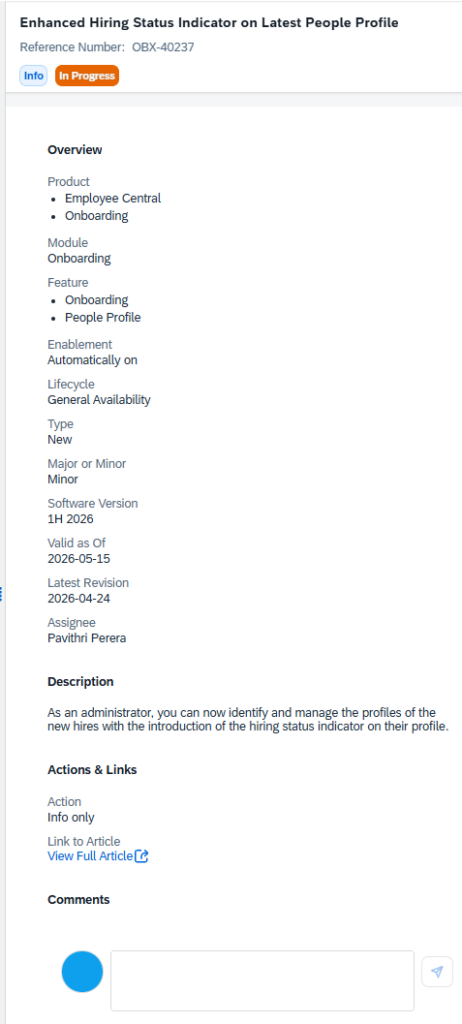
The Release Center details pane presents additional article information in a more readable format. SAP’s documentation highlights deprecation articles as especially important because failure to act on deprecated functionality can lead to disruption.
This is where Release Center becomes more than a filtered list. It starts to support the actual change management process, not just the reading of it.
Important limitations in 1H 2026
Release Center is new, so there are some practical limits administrators should understand before relying on it.
At this stage, it is available only in English, includes only the current release, does not visually indicate article updates from the SAP Help Portal, and is not intended to be a complete archive. SAP also notes that Release Center is not fully self-contained, so administrators may still need to refer back to the What’s New Viewer for more detail.
SAP further states that Release Center does not support NS2 or Sovereign Cloud release planning in 1H 2026. Those customers should continue using their existing release process.
What should organisations do now?
For SAP SuccessFactors customers, Release Center is best treated as an opportunity to improve release governance — not simply as another admin screen.
A practical first step is to confirm which administrators need access, then review the required role-based permissions. SAP’s documentation notes that administrators need Release Center access, assignment permissions if they assign work to others, and Release Center Object Permissions to ensure the content loads correctly.
From there, define a simple release workflow:
- Review tenant-filtered articles first.
- Prioritise critical, required and deprecation-related changes.
- Assign each article to the right functional or technical owner.
- Record findings and decisions in comments.
- Track progress through status updates.
- Validate high-impact changes through testing before production.
This does not remove the need for proper release planning. It gives teams a better way to manage the work.
The bigger shift, release management is becoming operational
The real value of Release Center is not just convenience. It reflects a broader shift in how SAP SuccessFactors release management should operate.
Rather than treating release notes as a document to read twice a year, administrators can start treating release management as an ongoing operational discipline. That means clearer ownership, better prioritisation, stronger documentation and fewer last-minute surprises.
For organisations running SAP SuccessFactors across HR, payroll, learning, performance, recruitment and workforce management, this matters. Small configuration changes can carry significant process impacts. Deprecations can create risk. New features can create value too — if teams have the time to assess and adopt them properly.
How Discovery Consulting can help
Discovery Consulting helps Australian organisations manage SAP SuccessFactors change with structure, clarity and practical governance.
For customers reviewing the 1H 2026 release, that can include release impact assessment, SuccessFactors health checks, administrator support, release testing planning, and identifying adoption opportunities across new and existing functionality. Half-yearly updates, reviews of deprecated functionality, and opportunities for adoption and expansion are already core to how we support SuccessFactors customers.
Release Center gives administrators a better starting point. The next step is to ensure the right people, processes, and governance are in place around it.
Reviewing your SAP SuccessFactors 1H 2026 release impact?
Talk to Discovery Consulting about your release readiness and ongoing SuccessFactors Application Management Support.